Since about 2006 I’ve been putting all of my writing projects into a software program called IdeaWeaver. I used IdeaWeaver as a note repository, personal knowledge base, and first drafting tool. It helped my wife and me write many articles and several non-fiction books. I loved working in IdeaWeaver rather than a word processor like Microsoft Word because it let me write content in chunks and organize them with topics, categories, and an outline. It totally got out of my way when it came to writing. However, IdeaWeaver also had serious limitations. It had no search, spell check, or the ability to work with images or any other kind of external file. It was strictly a first-draft content generation tool.
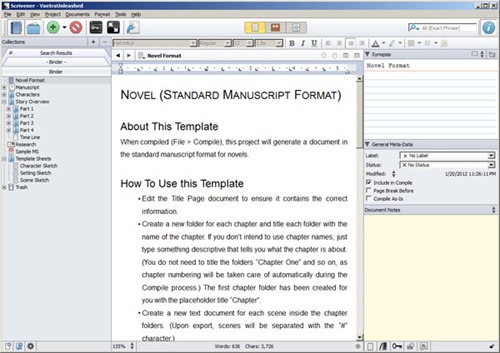 Over the years, a few other writing tools have hit the market. I kept hearing great things about Scrivener from other writers. When my wife started on her first fiction novel, I suggested she give Scrivener a try. She did, and she loved it instantly.
I was still finishing up Vaetra Untrained, so I didn’t move to Scrivener right away. I figured I’d try it out when I started the first draft of Vaetra Unleashed, the third Vaetra Chronicles novel. About two weeks ago, I finally installed Scrivener and went through the tutorial.
I was blown away.
Scrivener has all the features of IdeaWeaver, plus dozens more. The search feature is outstanding, and the organizational tools are marvelous. But for the most part, Scrivener hides its power and lets you concentrate strictly on writing if that’s all you need to do.
The strangest thing is that Scrivener has somehow improved my writing productivity. There’s something about the interface that sucks me into my manuscript and makes me want to keep writing. I’ve never experienced that feeling with any other writing tool. Normally, I get writing fatigue after a couple of hours and want to move on to something else. I haven’t figured out what Scrivener’s secret is, but I like it.
Scrivener is much more than a word processor. It is a writing environment. You can link external files into your project, collect research materials, categorize and tag content to your heart’s content, and of course, write at the speed of your fingers on the keyboard. I love the full-screen mode that lets you focus on a single scene at a time. Scrivener lets you develop content however you like and then compile it into a manuscript. It can even generate EPUB files for you, although you have to do a bit of work to create something that is publication-ready.
Not only have I started on Vaetra Unleashed in Scrivener, but I’m moving my Vaetra Chronicles world-building reference into a Scrivener project as well. Scrivener has excellent features for building knowledge base/compendium projects.
I’m sure Scrivener isn’t for anyone. The very things that give me happy tingles probably fill less techie users with confusion or dread. However, you can download the software for free and see if you like it before you spend a dime.
I highly recommend Scrivener to anyone who writes. At $40, this tool is a steal. See for yourself: